Friday, May 22, 2026

Project of the Students


Final Project - Highlights of the Year

This year I learned many things about technology, coding and digital projects. Here you can see some of my best works and also projects from my classmates.

No Author Project Topic Link
1
Álvaro 
Marrakech 

Using the program GIMP, we completed a project removing objects or

 people from an image that the teacher allowed us to choose.

link
2
Álvaro 

Postage stamp

In the postage stamp project, each student in the class made a

 stamp by adding an image of the school, its value, the country, 

and the date of creation.

link
3
Álvaro 
Flags

We recreated three European flags using the program Inkscape.

link
4
Álvaro 

Angel with phyphox

In this project, I used a set square, a triangle ruler, and a

 protractor to take measurements. Then, I worked with my classmates

 and organized the data in Excel to make calculations and tables.

link
5 Elena

Ercilla Museum

For this project, I used GIMP to turn a photo of our school into a realistic

 museum painting display using tools like perspective. 

This project helped me improve my GIMP skills.

link
6 EvaFrames

In this project, the teacher took photos of us, and

 then we created a project with colorful frames and

 face effects for each student in the class.

link
7 ÄngelMosaic of portraits

I created this image in GIMP using several portraits arranged in a grid.

 I applied pop-art color effects and added the blue frame and final title.

link


Thursday, April 16, 2026

angles with phyphox

In this project, I used a set square, a 45°/60° triangle, and a protractor to take measurements. I also worked with my classmates, collaborating as a team. Then, I transferred the data to Excel, where I organized it into tables and performed some calculations, combining manual and digital work to obtain clearer results.

Friday, February 6, 2026

Gimp 003 Photomontage

 Landscape

Old


New


In this project, I carried out an image editing task using digital tools to modify different visual elements. First, I changed the original sky in the image for a different one, creating a more eye-catching and attractive atmosphere. In addition, I added a duck into the scene, integrating it in a way that makes it look like part of the original image. With this edit, I practiced selection, cropping, and color adjustment techniques so that all the elements blended well and the final result looked natural and creative.

Wednesday, January 28, 2026

Marraketch Gimp

 Marraketch


The people present in the image were removed in order to improve the visibility of the landscape and highlight its natural elements, resulting in a cleaner and more focused composition.


Thursday, January 15, 2026

Wednesday, November 12, 2025

Problems

 41.- Think you want to print out a photograph with a size of DIN A4: 210 × 297 mm maintaining a printing quality of 200 dpi. Which resolution would the image need?

210 mm / 25.4 = 8.27 in

297 mm/25.4≈11.69 in

Step 2: Multiply by the desired dpi (200 dpi)

Width in pixels: 8.27×200≈1654 px

Height in pixels: 11.69×200≈2338 px

42.- Which resolution would the same picture need to have a 300 dpi picture?

Width: 8.27 in

Height: 11.69 in

Width in pixels: 8.27×300≈2481 px

Height in pixels: 11.69×300≈3507 px

 Required resolution at 300 dpi: 2481 × 3507 pixels

Tuesday, November 4, 2025

Description of second problem: Part 2º

 Using the same simple password for all accounts

Definition of the problem: 
Using the same password for every online account and application is a common but risky practice. It means that if one account is hacked, all others using the same password can also be compromised. Additionally, simple or short passwords are easy to guess or crack, making personal information vulnerable to cyberattacks and identity theft.

Good Links to Find Information

  1. National Cyber Security Centre (NCSC):
    https://www.ncsc.gov.uk/collection/passwords
    (Guidelines on creating strong, memorable passwords)

  2. Cybersecurity & Infrastructure Security Agency (CISA):
    https://www.cisa.gov/secure-our-world
    (Tips for staying safe online and protecting passwords)

  3. Norton Cyber Safety Blog:
    https://us.norton.com/blog/privacy/how-to-create-a-strong-password
    (Explains how hackers guess weak passwords and how to build strong ones)

  4. Google Safety Center:
    https://safety.google/security/passwords/
    (Tools and advice for managing and protecting passwords)

  5. Microsoft Security Blog:
    https://www.microsoft.com/en-us/security/blog/
    (Articles about online security and password management)


Five Good Tips to Avoid or Solve the Problem

  1. Use unique passwords for each account:
    Never reuse the same password. This limits the damage if one account is hacked.

  2. Create strong, complex passwords:
    Combine uppercase and lowercase letters, numbers, and symbols. Example: G!raffe_2025#

  3. Use a password manager:
    Password managers (like Bitwarden, 1Password, or LastPass) can create and remember strong passwords for you.

  4. Enable two-factor authentication (2FA):
    Add an extra layer of protection so that even if someone gets your password, they can’t access your account without the second verification step.

  5. Change passwords regularly and avoid sharing them:Update passwords every few months, and never send them by message or email.


Vote here for tip:link

Wednesday, October 22, 2025

Description of first problem : Part 1º


Not updating the mobile phone’s operating system.


Definition of the problem: 

This problem occurs when a user ignores or delays installing the latest operating system (OS) update on their mobile device. Operating system updates are by manasedrele ufacturers to improve security, fix bugs, enhance performance, and sometimes add new features. Refusing or postponing these updates can cause the phone to become vulnerable to security threats, run less efficiently, or lose compatibility with new apps.


Good Links to Find Information about the Problem and Solution

  1. Apple
  2. Google
  3. Horton
  4. Kaspersky
  5. TechRadar

Five Good Tips to Avoid or Solve the Problem

  1. Enable automatic updates:Turn on automatic updates so your phone installs new versions during the night or when you are not using it.
  2. Backup your dregularlyata :Make sure all your important files and photos are saved to the cloud or an external drive before updating, so you don’t have to worry about losing data.
  3. Keep your phone charged and connected to Wi-Fi:Updates require battery power and internet access, so prepare your phone before starting the process.
  4. Read update notes:Review what the new update includes — this helps you understand the improvements and security fixes you’ll get.
  5. Do not postpone too long:Waiting too long to update may expose your phone to viruses, malware, and app compatibility issues.
Click here to vote: link


Thursday, October 16, 2025

Friday, October 10, 2025

What would my computer be like?

 What would my computer be like?

Motherboard:

You can buy it here: link

This motherboard is designed for the latest generation of Intel processors, offering compatibility with the newest technologies on the market. It features a robust power delivery system (VRM) that ensures stable performance even under high-demand scenarios. Additionally, it includes advanced connectivity options such as built-in Wi-Fi, multiple high-speed USB ports, and support for ultra-fast storage.

Memory Ram:

You can buy it here: link


This is a high-performance memory designed for next-generation DDR5 platforms.
It features an aluminum heat spreader with an aggressive design in black and silver tones.
Equipped with dynamic, customizable RGB lighting, it supports 18 preset lighting effects through FURY CTRL software.
Certified for Intel XMP 3.0, it enables easy overclocking with factory-optimized profiles.
Available in various capacities and speeds, with options reaching up to 6400 MHz or higher.


Cpu:

You can buy it here: link


It is a 16-core, 32-thread processor designed for high performance.
It uses the Zen 5 architecture and is manufactured with a 4 nm process.
It has a base frequency of 4.3 GHz and a boost frequency of up to 5.7 GHz.
It is compatible with the AM5 socket and DDR5-SDRAM memory.

Graphies Card:

You can buy it here: link


It is a graphics card based on NVIDIA’s Blackwell architecture, compatible with technologies such as DLSS 4 and Ray Tracing.
It has a triple-fan cooling system for optimal performance.
The listed price is €400.95.
It is available for home delivery and can be paid in 3 installments.

Storage Devices

You can buy it here: link

Power Supply

Ypu can buy it here: link

Output devices

You can buy it here: link

Input Devices

You can buy it here: link

Total: 2374.70$


Thursday, October 2, 2025

INPUT DEVICES

 POST 8: INPUT DEVICES 

 Input devices allow users to enter data or commands into a computer or digital system. Without them, we wouldn't be able to interact with technology.


3 examples of input devices:

1. Keyboard

  • Function: Allows you to type text, numbers, and use control shortcuts.

  • Example use: Writing an email or entering a password.

2. Mouse

  • Function: Moves the pointer on the screen, selects, drags, or opens files.

  • Example use: Clicking on an icon to open a program.

3. Microphone

         Function: It converts sound into electrical signals

         Example of Use: A student records their voice with a microphone to make a podcast on their computer.


Wednesday, October 1, 2025

OUTPUT DEVICES

 POST 7: OUTPUT DEVICES


Output devices
are hardware components that receive processed information from the computer and present it to the user in a visual, auditory, or physical form. Their main function is to display the results of the computer’s work in an understandable way. You can buy it here: shop


3 Examples 

1. Monitor

  • Function: Displays images, text, and video.

  • Type: Visual output device.

  • Common use: Browsing the internet, watching movies, working with office or design software.

2. Printer

  • Function: Produces a physical copy (on paper or other materials) of a digital document or image.

  • Type: Physical output device.

  • Common use: Printing reports, photos, assignments, invoices, or even 3D objects (with 3D printers).

3. Speakers

  • Function: Play sounds or music generated by the computer.

  • Type: Auditory output device.

  • Common use: Listening to music, watching movies, video calls, or hearing system alerts.


Tuesday, September 30, 2025

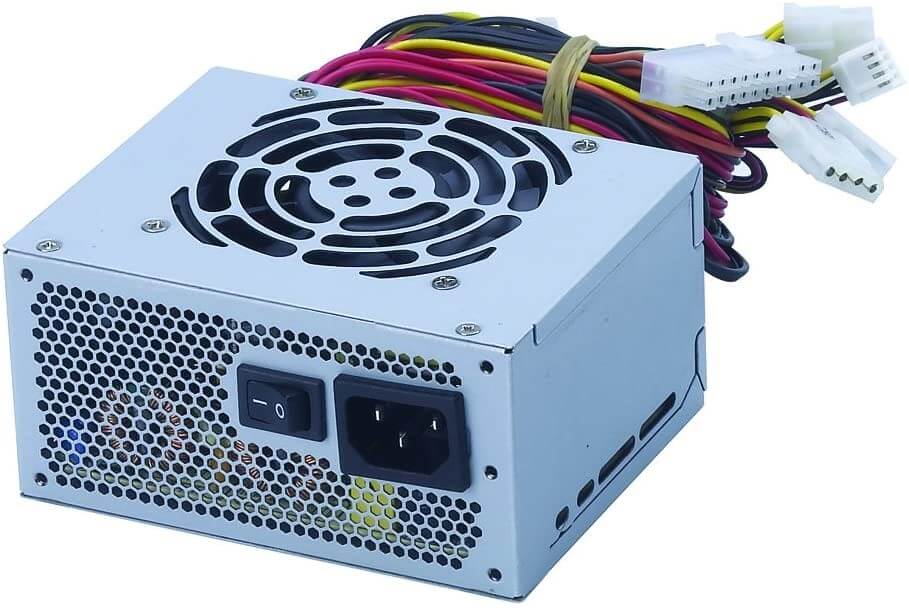
POWER SUPPLY (PSU)


 Post 6: Power Supply (PSU)


The power supply unit transforms the electricity from the wall into stable energy for the PC. It’s often underestimated, but it’s as important as the CPU or GPU.

Main features:

  • Wattage (W): determines how much power it can deliver. Example: a gaming PC usually needs between 600 W and 750 W.

  • Energy efficiency: PSUs with 80 Plus certification are more efficient and waste less energy.

  • Connectors: each GPU or motherboard requires specific cables.

Real-life example:

A PC with a powerful graphics card (e.g., RTX 3070) and a cheap 400 W PSU may shut down when gaming because it lacks enough power.

Tip:

Always choose a reliable brand PSU with enough wattage for your components.

STORAGE DEVICES


Post 5: Storage Devices (HDD, SSD, M.2)

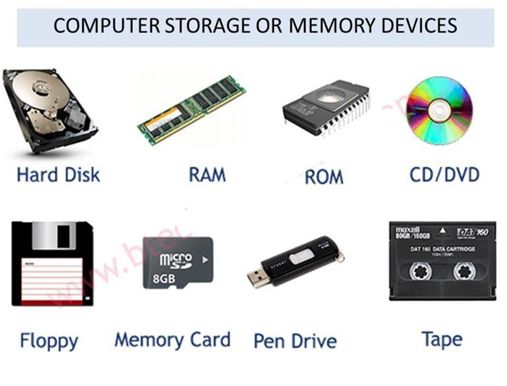
Storage is where all data is permanently saved: the operating system, programs, documents, photos, and games.

Main types:

  • HDD (Hard Disk Drive): cheaper and large capacity (1 TB+), but slower.

  • SSD (Solid State Drive): more expensive, but much faster (boots in seconds).

  • M.2 NVMe: the most advanced SSD type, 5–10x faster than an HDD.

Real-life example:

A PC with an HDD might take 1 minute to boot, while with an SSD it starts in just 10 seconds. Also, loading a game like Fortnite may take 3 minutes on HDD and only 30 seconds on SSD.

Tip:

The best combo is to use an SSD for Windows and programs and an HDD for storing photos, movies, or documents.


Look this video:

Project of the Students

  Final Project - Highlights of the Year This year I learned many things about technology, coding and digital projects. Here you can see...